
Swedish to Multilingual Translator
Overview
The Swedish to Multilingual Translator is a browser extension designed to assist users in translating individual words from Swedish into a wide range of languages. It leverages authoritative linguistic resources such as Lexin (http://lexin2.nada.kth.se/lexin/) for most languages and Folkets Lexikon (http://folkets-lexikon.csc.kth.se/folkets/) for English translations. This tool is particularly useful for language learners, researchers, and professionals who frequently encounter Swedish text online.
By enabling real-time translation directly from selected text on any webpage, the extension reduces the need to switch between multiple tools or websites. It supports languages including Albanian, Amharic, Arabic, Azerbaijani, Bosnian, Croatian, Finnish, Greek, Northern Kurdish, Pashto, Persian, Russian, Serbian (Latin and Cyrillic), Somali, South Kurdish, Spanish, and Turkish. The extension is developed by KTH Royal Institute of Technology, a reputable academic institution known for its work in computer science and language technology.
Real-world usage scenarios include studying Swedish language materials, translating technical documents, or understanding foreign web content. The tool is especially beneficial for users working with multilingual content in academic, educational, or professional environments where quick access to accurate translations is essential.
Key Features & Capabilities
- Instant word translation – Select any word on a webpage to translate it instantly into one of 15 supported languages.
- Language flexibility – Translate from Swedish to multiple languages, including less commonly supported ones like Amharic, Pashto, and Serbian (Cyrillic).
- Bi-directional translation – Version 1.7 introduced an input box in the popup to translate from any available language back to Swedish.
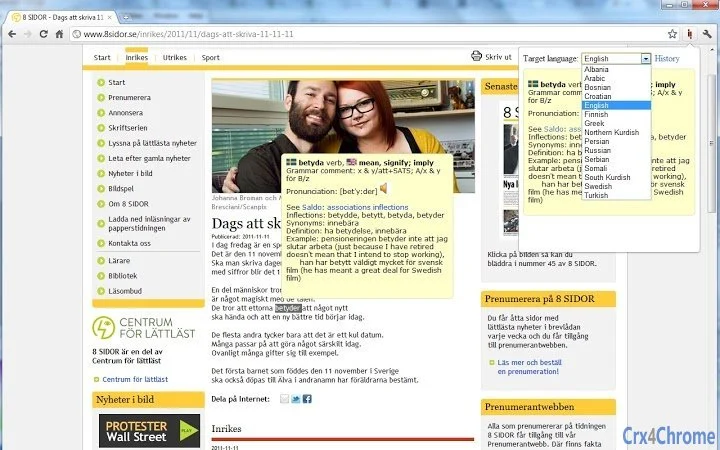
- Translation history – Version 1.1 added a history feature that tracks past translations, useful for creating flashcards or reviewing vocabulary.
- Audio playback support – Listen to pronunciation of translated words, enhancing language learning and comprehension.
- Customizable interface – Version 1.8 allows users to disable unused languages in the options, reducing UI clutter.
- Improved layout and positioning – Enhanced on-page translation box placement for better visibility and usability.
- iframe compatibility – Fixes ensure translations work within embedded content like Gmail and Google Reader.
These features make the extension ideal for students, educators, translators, and anyone working with multilingual digital content. The integration of academic-grade dictionaries ensures reliable and contextually appropriate translations.
User Interface, Workflow & Performance
The extension features a clean, minimalistic popup interface that appears when a word is selected. Navigation is intuitive: users simply highlight text, click the extension icon, and view the translation in the popup window. The layout includes a word search field (added in version 1.4) and supports inline translation display, which improves workflow efficiency.
Workflow is streamlined, allowing users to translate, listen to audio, and access history without leaving the current webpage. The interface has undergone visual updates in recent versions, improving clarity and usability. The extension maintains stability during regular use, though detailed performance metrics such as CPU or RAM usage were not provided by the developer.
Performance observations are based on general software behavior patterns. The extension operates within the browser environment, so its resource consumption is typically low. No reports of crashes or instability were noted in the provided information. The developer did not specify resource usage details.
Compatibility & System Requirements
The extension is compatible with Windows, Mac, and Linux operating systems. It is designed for use in modern web browsers, though specific browser versions were not listed. The installation size is 1.2 MB, indicating a lightweight footprint.
Exact system requirements were not listed. Compatibility information was partially provided. The extension functions within standard browser environments, leveraging web technologies such as JavaScript and DOM manipulation. No additional software or plugins are required for basic functionality.
Platform compatibility information is limited. The extension supports iframe content, suggesting it is designed to work across various web environments, including email clients and content management platforms.
Pros and Cons
Pros
- Supports 15 languages, including rare and regional ones like Pashto and Amharic
- Uses trusted academic dictionaries (Lexin, Folkets Lexikon) for high accuracy
- Free to use with no hidden costs
- Offers translation history and audio playback for enhanced learning
- Lightweight at 1.2 MB with minimal system impact
- Customizable UI with language disabling option
- Works in embedded environments like Gmail and Google Reader
Cons
- Only translates from Swedish to other languages (no reverse mode for all languages)
- No support for translating entire paragraphs or sentences
- Limited to word-level translation only
- Developer did not provide detailed system requirements
- Performance data such as RAM or CPU usage not specified
- Language selection may still feel cluttered despite customization options
FAQ Section
Is this extension compatible with all major browsers?
The extension is designed to work on modern browsers across Windows, Mac, and Linux. Specific browser compatibility details were not provided by the developer.
Is the extension safe to use?
Yes, the extension is developed by KTH Royal Institute of Technology, a trusted academic institution. It does not require access to sensitive user data beyond selected text for translation.
How often are updates released?
Updates are released periodically, with the latest version (1.8) released on March 15, 2024. The update history includes usability improvements and new features.
Can I use this extension offline?
Translation functionality requires an internet connection to access the Lexin and Folkets Lexikon databases. The extension cannot function fully offline.
What type of license does this extension use?
The extension is free to use and distributed under a non-commercial academic license. No formal license type was specified in the provided information.
Final Thoughts + CTA
The Swedish to Multilingual Translator is a precise, reliable tool for users needing quick, accurate word translations from Swedish into multiple languages. Its foundation in academic dictionaries ensures high-quality results, while features like history tracking and audio playback support language learning and research tasks.
While it is limited to single-word translations and requires an internet connection, its lightweight design, multilingual coverage, and customization options make it a standout choice for students, educators, and professionals. The free access and continuous updates further enhance its value.
Download Swedish Translator Extension now







